Texts#
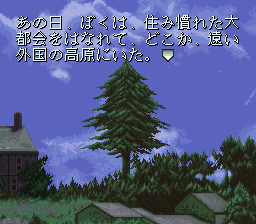
The words of a novel are kept in texts テキスト: named pieces of writing, apart from the cards, that a Show Text step types out onto the screen and a choice step offers as its question. A text can be a line or a whole scene of several pages, with its own pauses for the reader, line breaks and page breaks in it. This page covers the text list, the text editor and its keyboard, the marks, the text window in play, choice texts, and the one thing the cartridge has no command for, ruby.
The text list#
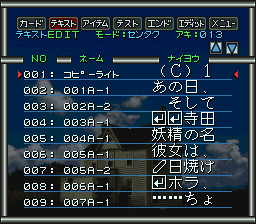
The Text tab lists the novel's texts: NO, Name ネーム and Contents ナイヨウ, the first characters of each, marks included (↵ for a new line, a slanting stroke for a new page). Sample part one has 218 texts. A on a text opens it in the text editor.
The tab's R menu makes, deletes, copies, moves and renames texts, as the card list's and the item list's do: the program's own messages ask for a new text's name テキストノネームヲ ニュウリョクシテ下サイ and refuse a name already in use テキストネームガ ジュウフクシテイマス. A name is up to 8 characters from the name grid: katakana, digits and A–Z (The editor). The sample names its texts by scene, 001A-1, 002A-2 …, and a step shows only the name, so a system like it pays.
The same list, with the same previews, fills the lower half of a card's page: it is where Show Text and the choices pick their text.
The text editor#
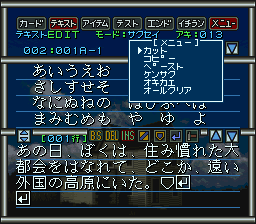
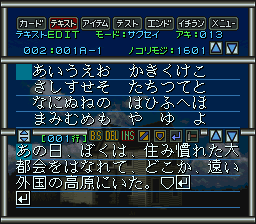 12345678
- 1 Status line テキストEDIT モード:サクセイ アキ:013 the tab, the mode (making) and the free blocks on the drive
- 2 The text 002:001A-1 its number in the text list and its name
- 3 Characters left ノコリモジ:1601 the room left in this text, of 1,792
- 4 Keyboard あいうえお かきくけこ four rows of one long sheet of characters; the cursor scrolls it
- 5 Line [001行] the line of the text
- 6 Editing keys BS DEL INS back space, delete, insert
- 7 Marks the new page, key wait and new line marks, and a fourth icon
- 8 Text あの日、ぼくは、… four lines of 14 characters at a time, with the marks: ♡ a key wait, ↵ a new line
The editor has the keyboard at the top, four rows of a long sheet of characters, and the text at the bottom, four lines of 14 characters at a time, the width of a line in play. Move the cursor on the keyboard and press A: the character goes into the text at the text's cursor. Characters left ノコリモジ counts down as you type (below).
Between the two, a bar holds the line the text's cursor is on [001行], BS, DEL and INS (back space, delete, insert) and the icons of the marks. R opens the editor's menu (below), L the System menu as anywhere in the editor; SELECT, X and Y do nothing here. The text is drawn in the novels' own font, as it will be in play.
The keyboard#
The keyboard is one long sheet, which scrolls as the cursor moves past its top or bottom row. In order:
| Part of the sheet | What is there |
|---|---|
| Hiragana | あ い う え お … ん, then the voiced and half-voiced ones and the small ones |
| Katakana | The same, with ヴ and ヵ |
| Symbols | Punctuation, brackets 「」『』【】, symbols such as ♪ & × =, shapes and arrows |
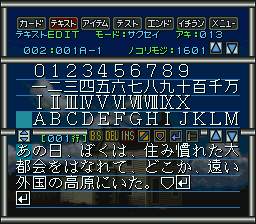
| Numbers | 0–9, the kanji numerals 一 … 万, Ⅰ–Ⅹ |
| Letters | A–Z and a–z, full width |
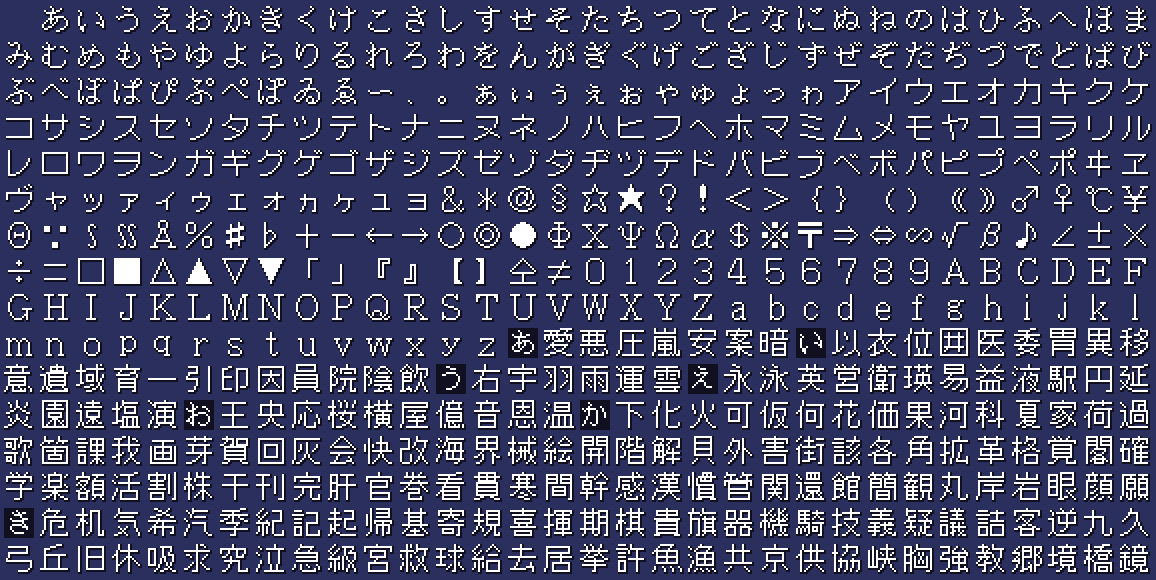
| Kanji | The kanji grouped by reading, each group opened by a shaded kana heading (あ, い, う …: 43 of them) |
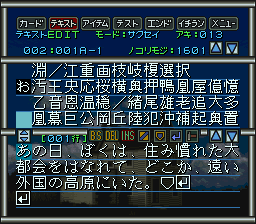
The kanji are grouped by reading, 1,035 of them, and each group is opened by a shaded kana, its heading: あ, い, う and so on, 43 headings in all. To find a kanji, scroll to the heading of the first kana of its reading. The あ group, for one, runs 亜 阿 哀 愛 悪 握 … and goes on to 逢 相 間 会 合 青 …. The headings only mark the groups; they never appear in a text.
All the characters are full width, 16 × 16 pixels, and the letters and digits are the full-width ones (A, 1), so a line holds 14 of anything. The font is the cartridge's own: 1,799 characters, among them the 1,035 kanji of the reading groups and a few hundred more, for names and for ghost stories (鬼 闇 呪 霊 …). Whether the keyboard reaches those wasn't recorded; a kanji the font lacks can't be written at all.
The marks#
A text holds three marks besides its characters, each put in from the bar's icons:
| Mark | In the editor | In play | Counts as |
|---|---|---|---|
| Key wait | ♡ | The text stops, ♡ shows, and A goes on | 1 character |
| New line | ↵ | The next character starts a new line | 1 character |
| New page | a slanting stroke | The text window is emptied, as by Clear Text, and the text goes on | 1 character |
| End | END, after the last character | Where the text stops | 1 character, always there |
The key wait is how a text paces itself. The reader sees ♡ where the text stops and presses A to go on; nothing else moves the text on. The new page empties the window at once, so end every page with a key wait before its new page (♡ then the stroke), as the sample does on almost every page; a new page alone would wipe the page before it could be read.
A new line breaks the line where you want. Without one, a line wraps on its own at the right edge of the text window. A line that exactly fills the width has already wrapped, so a new line straight after it leaves an empty line; the sample's title card uses that (below).
Characters left#
Characters left ノコリモジ is this text's room: 1,792, less what the text holds. Every character and every mark counts one, and so does the text's end, so a text holds at most 1,791 characters and marks. Sample part one's first text, 191 with its end, shows 1,601. At 0 the editor refuses more with コレイジョウ ニュウリョクデキマセン, "no more can be entered" (read from the program, not tried).
The count is for this text alone: a novel can have many texts of that size, as long as the drive's room (Free アキ, on the status line) holds out (Limits).
The R menu#
R in the text editor opens a menu of six:
| Command | On screen | What it does |
|---|---|---|
| Cut | カット | Takes characters out of the text into a buffer |
| Copy | コピー | Copies characters into the buffer |
| Paste | ペースト | Puts the buffer in at the cursor. With nothing in it: カットバッファ ニ モジ ガ アリマセン, "no characters in the cut buffer"; with too many for the text's room: ペースト モジスウ ガ オオスギマス |
| Search | ケンサク | Asks for the characters to find ケンサクモジレツヲ ニュウリョクシテクダサイ, then goes from one match to the next ツギ until Done オワリ |
| Replace | オキカエ | Asks for the characters to find and what to put in their place オキカエモジレツ ヲ ニュウリョクシテクダサイ, then asks Yes or No at each match |
| Clear All | オールクリア | Empties the text |
What each does beyond its name was read from the program's messages and lists, not tried: they also say when a search or a replace has finished ケンサク シュウリョウシマシタ. How a stretch of text is marked for Cut and Copy wasn't recorded.
The text window#
In play, a text is typed onto the picture a character at a time, white with a dark edge, with no box around it; a window frame picture can give it one (Set Graphic). The reader can't hurry it.
The screen is a grid of 16 columns and 14 lines of character cells, numbered from 0 at the top left. Unless a step says otherwise, a text starts at column 1 of line 1 and fills 14 characters a line, the line the editor shows. Five steps of the Text group change that, and stay in force from card to card until changed again:
- Text Area テキスト ヒョウジハンイ sets the rectangle texts are written in. Its page asks where it starts, from the first column カイシ ケタ, and its size; the step list shows it as its edges, left/top–right/bottom:
02/05-12/08is columns 2 to 12 of lines 5 to 8. Texts wrap at its right edge. - Text Position テキスト ヒョウジカイシイチ puts the next character at a column and line of the screen.
- Text Speed テキスト ヒョウジソクド: 01 the fastest, 16 the slowest. The sample tells its story at 03, writes its slow lines at 12 and its titles' readings at 01.
- Clear Text テキスト ショウキョ empties the window, as the new page mark does.
- New Line カイギョウ, as the mark.
A text goes on where the last one stopped. Show two texts one after the other, and the second continues the first's line, unless a Clear Text, a new page or a Text Position comes between. The sample splits long scenes over several texts this way, and an item shown with Show Item sits in the middle of a sentence the same way (The steps).
Colours#
Each Show Text step gives its text one colour ヒョウジカラー, for the whole text:
| No. | Colour | On screen |
|---|---|---|
| 0 | white | シロ |
| 1 | red | アカ |
| 2 | orange | オレンジ |
| 3 | yellow | キイロ |
| 4 | green | ミドリ |
| 5 | blue | アオ |
| 6 | purple | ムラサキ |
| 7 | black | クロ |
The sample writes in white, but for its copyright line in blue and ten texts in black, shown on a screen faded out to white. A word of another colour in a sentence is a text of its own, placed after the rest.
Choice texts#
A choice text is an ordinary text that a choice step names: Two-way or Three-way Choice, or the same to Item (Text choices). Its first line is the question, and each line after it is a choice, so write it with a new line mark after the question and after each choice but the last. It needs no key waits:
どちらへ いきますか?↵左の 道↵右の 道
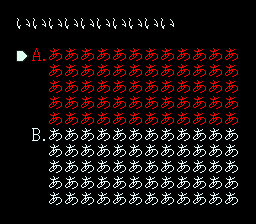
The player lays a choice out itself, the same way every time: the question from column 1, wrapping at 14 characters; a blank line; then each choice with its letter A., B. or C. in column 2 and its text from column 3, wrapping at 12. The cursor ▶ stands in column 1, and the line under it takes the step's chosen colour センタクカラー, the rest its base colour キホンカラー. Once the reader picks, the chosen line is shown again alone with ♡, and A goes on.
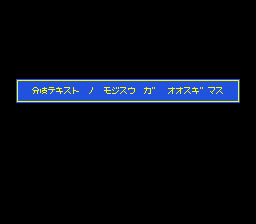
It must fit in 12 lines. One line more and the novel stops when the reader reaches it, with 分岐テキスト ノ モジスウ ガ オオスギマス, "the choice text has too many characters". The editor doesn't count lines for you, so test every choice once. With a one-line question, two choices can have five lines (60 characters) each, three choices three lines (36 characters) each, with a line to spare.
Ruby by hand#
Japanese writes a reading over a hard or unusual kanji in small kana, ruby ルビ. The cartridge has no ruby, and no small characters: but the sample writes a reading over its title, ニンフ over 妖精 (a fairy, read "nymph"), by placing a text of its own in an empty line above the word.
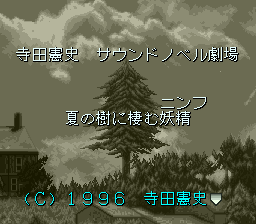
The title card does it in four steps after the title's own text:
- Leave an empty line above the word. The title's text writes 寺田憲史 サウンドノベル劇場, which fills the 14 columns exactly and wraps, then three new lines: the title's second line comes out on line 7, with line 6 empty above it.
- Text Position to the column of the word's first character, on the empty line: column 10, line 6.
- Text Speed 01, and Show Text the reading, a text of its own:
ETC001, ニンフ. - Text Position to where the writing goes on next, here the copyright on line 12, and Show Text it.
The first card does the same in a small text area in the middle of the screen: there the line before the word ends in a space that wraps alone onto the line above 妖精, the reading goes in at column 5, line 6, and a second Text Position to column 7, line 7 writes the rest of the sentence, と出会った……, straight after the word. One reading text serves every place the word appears: ETC001 is shown twice in part one, in both cards.
Fan-made reference material, one of the Eschaton Games Tsukuru guides. Not affiliated with the publishers of the titles it covers. Corrections and questions: contact@eschaton.games.