Saving and sharing#
A novel lives in the cartridge's battery memory, one at a time. This page says how the cartridge keeps it and checks it, what the Data データ page does to it, how a memory pack and a Turbo File Twin take copies, what goes along with a copy and what stays behind, and the two things a memory pack can carry besides your saves: novels to read, and Kanadeeru's songs. It describes what you see; the byte layouts are on How it works.
Where a novel lives#
| Where | Novels | Room | What you do there |
|---|---|---|---|
| The cartridge (64 KB battery memory) | one | 425 blocks of 128 bytes for cards and texts | make, edit and play it: Edit, Game → User Game ユーザーゲーム |
| The ROM | the two sample parts | read only | play them (Game → Sample Game サンプルゲーム), or copy one onto the cartridge (Data → Sample Load) |
| A memory pack (in the slot on top) | 8 saves, SOUND NOVEL 1–8 | one 128 KB block each | Memory Pack: save, load, delete. Also novels to read and Kanadeeru's songs (below) |
| A Turbo File Twin (on port 2) | 3 saves, SOUND NOVEL 1–3 | 124 blocks of 1 KB, shared | Turbo File: save, load, delete |
The cartridge holds one novel. Its 64 KB of battery memory are laid out as a small disk of the program's own, which this guide calls a drive: the novel's cards, its texts, its items and its start card are files on it, and each file takes whole blocks of 128 bytes. The two sample parts in the ROM are drives of exactly the same kind, which is why the program can play them as it plays yours, and copy them into the cartridge for you to edit.
Nothing reaches the cartridge until you leave the editor. The editor works on a copy in the console's memory. End Editing エディット シュウリョウ in the System menu (L) asks whether to save (セーブ スル / セーブ シナイ / キャンセル: save, don't save, cancel), and only Save writes the drive; with Autosave オートセーブ モード on, the editor writes as you go (The editor). Switching off in the editor loses what you did since the last save.
Room on the cartridge#
The editor's status line shows Free アキ, the blocks left on the drive. An empty cartridge shows 425: the drive has 433 blocks for files, and the first time the editor opens it makes three files of its own, the item file, the end card and the start card's record, which take eight.
- Every card and every text takes at least one block, so a novel has at most 425 cards and texts together, however short they are. A block holds a text of up to 63 characters (the marks for a key wait, a new line and a new page count as characters); a longer text takes a block for every 64 characters more.
- The sample fills its drive. Part one is 46 cards and 218 texts in 419 blocks; loaded into the editor it leaves 13 free. Part two leaves 1. To write much of your own on top of a sample, delete some of its texts first.
- Each limit on what a novel can hold is on Limits, bugs and messages.
The power-on check#
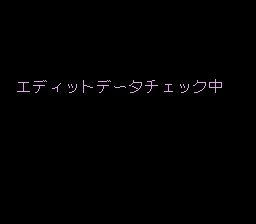
Each time the console is switched on, the program checks the memory pack (メモリーパック確認), shows the ASCII logo, and then checks the drive, with エディットデータチェック中 ("checking the edit data") on screen. Two check sums guard the drive: one over its name, one over everything in it.
If either sum is wrong, the program offers to initialise the drive: データを初期化します。Aボタンを押してください。 ("The data will be initialised. Press the A button.").
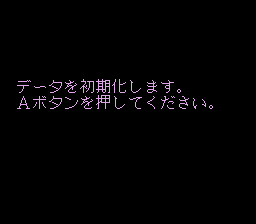
- Nothing is written until you press A, and there is no way to decline: B, START, X and SELECT do nothing. A empties the drive, and the title follows.
- Switching off at the prompt keeps the save as it is. A cartridge whose save has slipped a bit can be switched off here, dumped, and mended on a computer.
- The check runs at power-on only. RESET restarts the program without it (and without the logo and the opening).
Data#
Data データ on the main menu has three entries, all about what is on the cartridge:
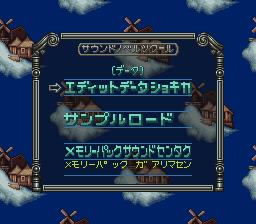
Initialise Edit Data エディットデータショキカ asks エディットデータヲ ショキカ シマス ("initialise the edit data"), Yes / No ハイ / イイエ. It is the way to start again from an empty cartridge. The study saw the question but did not run it through; that it empties the drive as the power-on prompt does is what it says, not something checked.
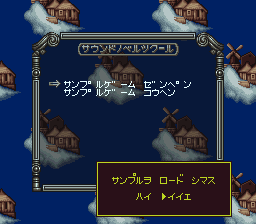
Sample Load サンプルロード lists the two sample parts (part one ゼンペン, part two コウヘン), then asks サンプルヲ ロード シマス ("load the sample"), with the cursor on No. Yes copies the whole sample over your novel: every card, text and item, exactly as the ROM holds them. Whatever was on the cartridge is gone. The sample is then a novel like any other, to read in the editor, take apart, test from any card, or change. The ROM's copy can't be harmed, so a sample can be loaded again at any time.
Memory Pack Sound メモリーパックサウンドセンタク chooses a file of Kanadeeru's songs on a memory pack (below). Without one it reads ツカイマセン, "not used".
The memory pack#
The cartridge has a slot on top for a Satellaview memory pack, an 8 Mbit flash pack. Memory Pack メモリーパック on the main menu takes copies of your novel there: up to eight, one to each of the pack's eight blocks of 128 KB. Since the cartridge holds one novel, the pack is the way to keep several, or to carry one to another cartridge.
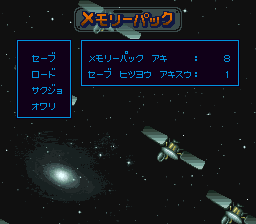
The page offers Save, Load, Delete and Done セーブ, ロード, サクジョ, オワリ. Beside them, the pack's free blocks メモリーパック アキ and the blocks a save needs セーブ ヒツヨウ アキスウ, always 1: a saved novel takes one whole block, however small the novel is.
Save#
Save lists eight slots, SOUND NOVEL 1 to SOUND NOVEL 8, four at a time (↑ ↓ scroll). An empty slot shows ***.
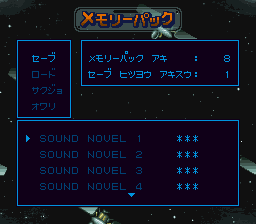
- An empty slot saves at once, with no question: メモリーパックニ セーブ シテイマス。シバラク オマチクダサイ。 ("saving to the memory pack; please wait").
- A used slot asks first: コノ データ ニ、ウワガキ シマス ヨロシイデスカ。 ("overwrite this data?"), with the cursor on No. Yes saves over it in place.
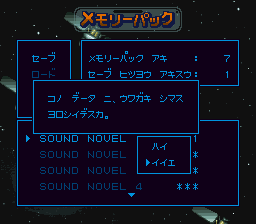
The slot is only a name. The novel goes into the first free block of the pack, whatever slot you chose: a save to slot 3 on a pack that held only slot 1 went into the pack's second block. So the slot number tells your saves apart; it doesn't say where they are, and a pack's blocks are shared with any other program's files on it (RPG Tsukuru 2's games, Kanadeeru's songs).
Load and Delete#
Load and Delete list the slots in the same way, then ask コノ データ ヲ、ロード シマス ヨロシイデスカ。 or … サクジョ シマス … ("load / delete this data?"), again with the cursor on No. On a pack with no saves they say so: メモリーパックニハ セーブサレタ データガ アリマセンデシタ ("there was no saved data on the memory pack").
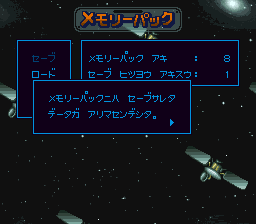
- Load replaces the novel on the cartridge with the saved one, every file of it. A load ends with ロード シュウリョウ シマシタ。Aボタンヲ オシテクダサイ。 ("loading finished; press A"). Save the cartridge's own novel to another slot first if you want to keep it.
- Delete frees the slot's block. The pack erases flash in 64 KB pieces, so Delete wipes the first half of the block (the file's name and the first half of the novel) and leaves the second half's bytes behind, unreadable as a file.
The Turbo File Twin#
ASCII's Turbo File Twin is a battery-backed box for the console's second controller port. Sound Novel Tsukuru uses it in its STF mode, with 124 blocks of 1 KB, and keeps three slots there, SOUND NOVEL 1 to 3.
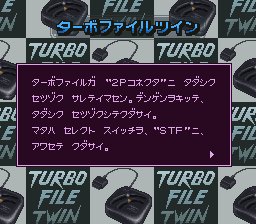
Turbo File ターボファイル on the main menu first looks for the device. With nothing on port 2 it says the Turbo File is not properly connected to the 2P connector, and asks you to switch off and connect it, or to set its select switch to STF:
A blank Twin is formatted first. On a device that has never been formatted the page says ターボファイルヲ ショキカ シマス。"PROTECT"スイッチヲ "OFF" ニシテ、Aボタンヲ オシテクダサイ。 ("the Turbo File will be initialised; set the PROTECT switch to OFF and press A"). A formats it. (Whether another button backs out was not tried.)
Then the same four entries as the pack's, Save, Load, Delete and Done, beside the Twin's free blocks ターボファイル アキ (124 on an empty Twin) and the blocks a save needs セーブ ヒツヨウ アキスウ. Each step shows ターボファイル アクセスチュウ、シバラク オマチクダサイ。 ("accessing the Turbo File; please wait") while the program reads the device.
A save takes only what the novel uses. Unlike the pack's fixed block, a Twin file holds the drive up to its last used block, so its size follows the novel:
| The novel | Blocks of 1 KB on the Twin |
|---|---|
| An empty drive | 10 |
| Sample part one | 62 |
| A full drive (no free blocks) | 64 |
| The Twin | 124 in all |
So the Twin holds one full novel and a smaller one; the third slot is of use only when the novels are small. The page's figure for the blocks a save needs is close to the file's size: 63 for the sample, whose file takes 62.
- Load reads the file, checks its sum, and copies back the novel's files only. It refuses a file whose sum is wrong. The ROM also carries the message ファイルガ、コワレテイマス。ザンネンデスガ、ファイルヲ サクジョシマス。 ("the file is damaged; sorry, it will be deleted"), the way RT2 treats a damaged file, but no damaged file was tried here.
- Saving over a used slot asks the same overwrite question as the pack (read from the program).
- Delete frees the file's blocks on the Twin.
- It is slow. Loading the sample took about 30 seconds, and the slot list ignores the pad for some 17 seconds after it appears while the program is still reading the device. Wait for it.
Memory pack or Twin#
| Memory pack | Turbo File Twin | |
|---|---|---|
| Slots | 8, SOUND NOVEL 1–8 | 3, SOUND NOVEL 1–3 |
| A save takes | one 128 KB block, whatever the novel | as many 1 KB blocks as the novel uses: 10 to 64 |
| Where it goes | the first free block, whatever the slot | the first free blocks |
| Before the first save | nothing | the Twin is formatted if blank |
| Saving over a slot | asks first, cursor on No | the same question (read from the program) |
| Load | the whole novel back | the novel's files back, after a check of the file's sum |
| Delete | asks first; wipes the first half of the block | frees the file's blocks |
| Also carries | other programs' files; novels to read (ADDM, ADRD); Kanadeeru's songs | other games' files |
| In an emulator | Mesen 2 or MesenCE with a pack image; not bsnes | MesenCE only |
What goes along#
A copy carries the novel and nothing else. Every card, text and item, and the start card with it, travel in a pack save, a Twin save and a Sample Load. What stays on the cartridge:
| What | Sample Load | Memory pack save and load | Turbo File save and load |
|---|---|---|---|
| Cards, texts, items, the start card | copied (the sample's replace yours) | saved and loaded whole | saved and loaded whole |
| Free blocks | the sample's | the novel's, exactly | the novel's; free blocks keep whatever the cartridge had |
| The reading a save point keeps | stays | stays on the cartridge | stays on the cartridge |
| Config: Sound Mode, Cursor Speed | stays | stays | stays |
| The editor's System settings (Autosave, Background Select, Editor Frame, Wallpaper, Editor Music) | stays | stays | stays |
| The Memory Pack Sound choice | stays | stays | stays |
The reading stays behind. A save point keeps one saved reading for the whole cartridge, beside the drive rather than in it (Playing and testing). No save or load moves it: a reader can't carry a reading to another cartridge, and loading a novel doesn't wipe the reading of the one before. The reading continues a novel whose start card has the same name and the same stamp, a number the editor raises each time you set the start card. So a novel saved to a pack and loaded back unchanged would be continued from the reading as before (inferred from how the check works; not tried).
Novels on a memory pack#
A memory pack can also carry novels for reading. At power-on the program looks at the first word of the pack's blocks. A block marked as a novel (its first four letters ADDM or ADRD, where the program's own saves are ADSV) is taken as a drive of its own, as the samples in the ROM are:
- Game → Sample Game ゲーム → サンプルゲーム lists it after the two sample parts, by the name in its header, and plays it straight from the pack.
- Data → Sample Load lists only the
ADDMkind, and copies it into the cartridge like a sample. SoADDMis a novel that can also be edited, andADRDone that can only be read.
Both were tried in the emulator with a pack save whose four letters were changed by hand: each played under Sample Game, and only the ADDM one was offered by Sample Load. No such pack is known, and nothing in the game writes one. They were presumably meant for novels to be sold or broadcast (inferred). A third kind, TC, is read at power-on too, but no page lists it, so what it would have held is open.
Kanadeeru's songs#
A novel can play songs made in Kanadeeru, ASCII's music maker for the Super Famicom. Kanadeeru's Convert writes songs to a memory pack, in one file titled KANADERU CONVERT, for RPG Tsukuru 2; Sound Novel Tsukuru reads the same file (Kanadeeru's guide: Songs for RPG Tsukuru 2).
- In Kanadeeru, convert your songs onto a memory pack (Kanadeeru's Data → Convert).
- Put the pack in Sound Novel Tsukuru's slot and switch on. Go to Data → Memory Pack Sound. The list shows every song file on the pack by its title (KANADERU CONVERT), then ツカイマセン, "not used". Choose the file.
- The cartridge remembers the choice and finds the file on the pack again at each power-on (by its title, as far as the program shows; inferred).
- The pack's songs are BGM 60 and up: song 1 of the file is 60, song 2 is 61, after the cartridge's own 0–59 (Music and sound). A Start BGM step with one of those numbers plays the pack's song, on the same instruments as in Kanadeeru.
What was run: a pack carrying two songs (written by the study's tools in Kanadeeru's format) showed as KANADERU CONVERT, was chosen, and after a power-on a novel whose Start BGM step names song 60 played the pack's first song. Whether the editor's music list offers 60 and up was not looked at; the novel that played it was written by a tool. A number past the pack's last song plays nothing, and so, by the program's logic, does any number from 60 when no pack file was found at power-on.
The messages#
The memory-pack and Turbo File pages speak in windows of their own. The study saw the ones marked seen; the rest are the program's own windows that its runs never brought up, so the wording is certain and the occasion is what the words say.
| Page | Message | In English | Seen |
|---|---|---|---|
| Power-on | メモリーパック確認 | Checking the memory pack | seen |
| Power-on | エディットデータチェック中 | Checking the edit data | seen |
| Power-on | データを初期化します。Aボタンを押してください。 | The data will be initialised. Press the A button. | seen |
| Data | エディットデータヲ ショキカ シマス (Yes / No) | Initialise the edit data? | in the ROM |
| Data | サンプルヲ ロード シマス (Yes / No) | Load the sample? | seen |
| Memory pack | メモリーパック アキ / セーブ ヒツヨウ アキスウ | The pack's free blocks / the free blocks a save needs | seen |
| Memory pack | メモリーパックニ セーブ シテイマス。シバラク オマチクダサイ。 | Saving to the memory pack. Please wait a moment. | seen |
| Memory pack | コノ データ ニ、ウワガキ シマス ヨロシイデスカ。 | This data will be overwritten. All right? | seen |
| Memory pack | コノ データ ヲ、ロード シマス ヨロシイデスカ。 | This data will be loaded. All right? | seen |
| Memory pack | コノ データ ヲ、サクジョ シマス ヨロシイデスカ。 | This data will be deleted. All right? | seen |
| Memory pack | ロード シュウリョウ シマシタ。Aボタンヲ オシテクダサイ。 | Loading finished. Press the A button. | seen |
| Memory pack | メモリーパックニハ セーブサレタ データガ アリマセンデシタ。 | There was no saved data on the memory pack. | seen |
| Memory pack | メモリーパック アクセスチュウ、シバラク オマチクダサイ。 | Accessing the memory pack. Please wait a moment. | in the ROM |
| Memory pack | メモリーパックカラ ロード シテイマス。シバラク オマチクダサイ。 | Loading from the memory pack. Please wait a moment. | in the ROM |
| Memory pack | メモリーパックガ イッパイデ、セーブ デキマセン。ファイルヲ サクジョシテ アキヲ ツクッテクダサイ。 | The memory pack is full and can't be saved to. Delete a file to make room. | in the ROM |
| Memory pack | メモリーパックガ "サシコミグチ"ニ タダシク セツゾク サレテイマセン。デンゲンヲキッテ、タダシク セツゾク シテクダサイ。 | The memory pack isn't properly connected to the slot. Switch off and connect it properly. | in the ROM |
| Memory pack | メモリーパックノ アクセスニ シッパイ シマシタ。メモリーパックヲ チェックシテ クダサイ。 | Access to the memory pack failed. Check the memory pack. | in the ROM |
| Turbo File | ターボファイルガ "2Pコネクタ"ニ タダシク セツゾク サレテイマセン。デンゲンヲキッテ、タダシク セツゾクシテクダサイ。マタハ セレクト スイッチヲ、"STF"ニ、アワセテ クダサイ。 | The Turbo File isn't properly connected to the 2P connector. Switch off and connect it properly, or set its select switch to STF. | seen |
| Turbo File | ターボファイルヲ ショキカ シマス。"PROTECT"スイッチヲ、"OFF" ニシテ、Aボタンヲ オシテクダサイ。 | The Turbo File will be initialised. Set the PROTECT switch to OFF and press the A button. | seen |
| Turbo File | ターボファイル アキ / セーブ ヒツヨウ アキスウ | The Twin's free blocks / the free blocks a save needs | seen |
| Turbo File | ターボファイル アクセスチュウ、シバラク オマチクダサイ。 | Accessing the Turbo File. Please wait a moment. | seen |
| Turbo File | ターボファイルニ、セーブ シテイマス。シバラク オマチクダサイ。 | Saving to the Turbo File. Please wait a moment. | in the ROM |
| Turbo File | ターボファイルカラ ロード シテイマス。シバラク オマチクダサイ。 | Loading from the Turbo File. Please wait a moment. | in the ROM |
| Turbo File | ターボファイルニハ セーブサレタ データガ アリマセンデシタ。 | There was no saved data on the Turbo File. | in the ROM |
| Turbo File | ターボファイルガ イッパイデ、セーブ デキマセン。ファイルヲ サクジョシテ アキヲ ツクッテクダサイ。 | The Turbo File is full and can't be saved to. Delete a file to make room. | in the ROM |
| Turbo File | ファイルガ、コワレテイマス。ザンネンデスガ、ファイルヲ サクジョシマス。 | The file is damaged. Sorry, but the file will be deleted. | in the ROM |
| Turbo File | ターボファイルノ アクセスニ シッパイ シマシタ。ターボファイルヲ チェックシテ クダサイ。 | Access to the Turbo File failed. Check the Turbo File. | in the ROM |
| Turbo File | ターボファイルノ デンチガ ノコリスクナク ナッテイマス。デンチヲ コウカンシテクダサイ。 | The Turbo File's battery is running low. Replace the battery. | in the ROM |
| Turbo File | ターボファイルガ カキコミキンシ ニ ナッテイマス。ツヅケルニハ "PROTECT"スイッチヲ、"OFF"ニシテクダサイ。ショリヲ ツヅケマスカ | The Turbo File is write-protected. To go on, set the PROTECT switch to OFF. Go on? | in the ROM |
| Turbo File | アクセス スルニハ、"PROTECT"スイッチヲ、"OFF"ニシテクダサイ。 | To access it, set the PROTECT switch to OFF. | in the ROM |
Keeping a novel safe#
- Leave the editor with Save, or turn Autosave on, before you switch off.
- Save to a memory pack or a Twin after a good session. A pack keeps eight novels; a Twin one or two, and a third if they are small.
- Before Sample Load or a pack load, save your own novel to a slot: both replace it entirely.
- On a second-hand cartridge, dump the save first, and switch off at the format prompt rather than press A (above).
- In an emulator, the save file is the cartridge's 64 KB: copy it aside as you would a pack save. The study's tools can also write a novel straight into a save file (How it works).
Fan-made reference material, one of the Eschaton Games Tsukuru guides. Not affiliated with the publishers of the titles it covers. Corrections and questions: contact@eschaton.games.