Branches and items#
A novel is a set of cards, each a list of steps. The reader goes through one card at a time, and the steps of the Branch group 分岐 decide which card comes next: a plain jump, a choice the reader makes, or a test of what the reader has done so far. What the reader has done is kept in items アイテム, the novel's own variables, which the steps of the Item group アイテム set and show.
This page covers both groups and how they work together. The steps has every command's page in the editor; this page is about the shape of a story.
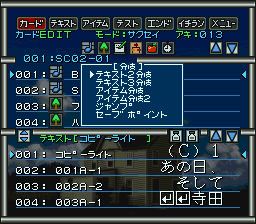
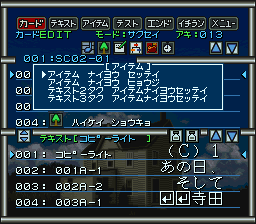
| Step | Group | What it asks | In play |
|---|---|---|---|
| Jump ジャンプ | Branch | a card, from the list of the novel's cards | the reading goes on at the top of that card |
| Two-way Choice テキスト2分岐 | Branch | a choice text, the base colour, the chosen colour, Card:A and Card:B | the reader picks A or B and the reading goes to its card |
| Three-way Choice テキスト3分岐 | Branch | the same, with Card:C | the same, with three choices |
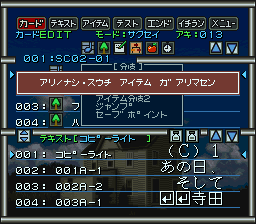
| Item Branch アイテム分岐 | Branch | an item, what to test it against, and Card:A | if the test holds, the reading goes to the card; if not, the card goes on to its next step |
| Item Branch 2 アイテム分岐2 | Branch | the same twice: a test and Card:A, a test and Card:B | the first test that holds sends the reading to its card; if neither does, the card goes on |
| Save Point セーブポイント | Branch | nothing (OK?) | keeps the reading in the cartridge's one slot (Playing and testing) |
| Set Item アイテム ナイヨウ セッテイ | Item | an item, then its new value (nothing for a Name item) | the item takes the value; a Name item asks the reader to type a name |
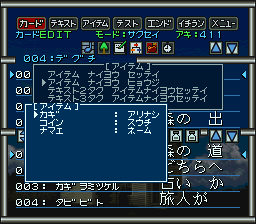
| Show Item アイテム ナイヨウ ヒョウジ | Item | an item (for a Yes/No item, its wording too) | the item's value is written in the text window |
| Two-way Choice to Item テキスト2タク アイテムナイヨウセッテイ | Item | a choice text, the two colours, and for each choice an item and a value | the reader picks; the chosen line's item takes its value, and the card goes on |
| Three-way Choice to Item テキスト3タク アイテムナイヨウセッテイ | Item | the same for three choices | the same |
Cards and jumps#
When a card is reached, its steps run from the first to the last. Most steps do their work and pass on to the next: they show a picture, start a song, type out a text and wait for the reader. A Jump ジャンプ ends the card there and then: the reading goes on at the top of the card it names, and any steps after the jump are never reached. A branch that is taken does the same.
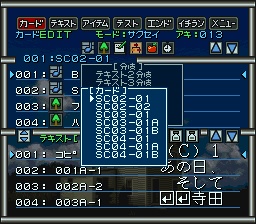
A card is named with up to 8 characters from the name grid, and steps find cards, texts and items by name. The player looks each one up as it comes to it, so a step that names a card no longer on the drive is only found out when a reader gets there: the novel stops with カード ガ アリマセン, "no such card" (When a novel stops). After deleting or renaming a card, a text or an item, test every path that leads to it.
The card list's Type column タイプ is a label for you, the author:
| The list shows | Meaning | Set by |
|---|---|---|
| START | the start card; its own label follows after S/ (S/ア[1]分岐) | Start Card in the card menu |
| NORMAL | a card with no branch label | making a card |
| テ[2]分岐 | a two-way text choice | adding a Two-way Choice |
| テ[3]分岐 | a three-way text choice | adding a Three-way Choice |
| ア[1]分岐 | an item branch | adding an Item Branch 2 (an Item Branch with one test leaves the label as it was) |
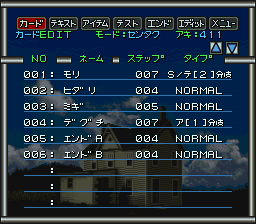
The label is set when a branch step is added to the card, whatever else the card holds. It is only a reminder: the player never reads it, and a card's real branches are its steps.
The start card and END#
One card is the start card. Put the card list's cursor on it and choose Start Card スタートカード from the card list's menu (R); the list marks it START. Every reading begins there: from the Game menu, and from a test begun from the start card. A novel with no start card won't begin at all: the Game menu's User Game says スタートカード ガ アリマセン, "there is no start card" (which is what the cartridge's empty save shows).
END is a card every novel has, with no steps. It is the last entry in the branches' card lists. A jump or a branch to END ends the reading, and the main menu comes back. No card of yours can be called END: the editor refuses the name with カードネーム ニ END ハ ツカエマセン, "END can't be used as a card name".
A card whose steps run out ends the reading too, as END does: the player stops when a card has no more steps and no jump has been taken. END is itself a card with no steps, so the two endings are one and the same: the main menu comes back after the last key wait, or the editor after a test (tried in an emulator). The sample's endings work this way: part one's last card ends on a wait for a key, and the next press of A brings back the main menu.
Text choices#
Two-way Choice テキスト2分岐 and Three-way Choice テキスト3分岐 let the reader decide. Each asks four things, in order:
- The choice text テキスト センタク: a text from the text list. Its first line is the question, and each further line is a choice, so write it with a New Line mark at the end of the question and of each choice (Choice texts).
- The base colour キホンカラー, the colour of the question and the choices, and the chosen colour センタクカラー, the colour of the line under the cursor. Both from the eight text colours: white, red, orange, yellow, green, blue, purple, black. The samples use white with red.
- Card:A, Card:B (and Card:C): the card each choice leads to. END is in the list.
- OK? ハイ / イイエ.
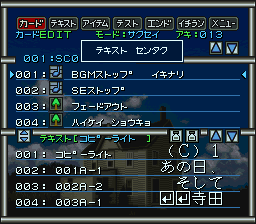
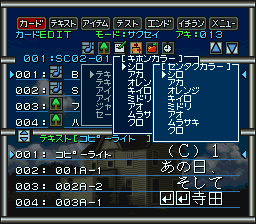
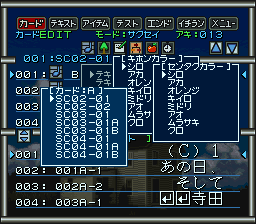
In play the question appears, a blank line, then the choices labelled A., B. and C. with a cursor ▶. ↑ and ↓ move the cursor, and the line under it takes the chosen colour. A picks. The chosen line is then shown again on its own, with ♡, and the next A goes to its card.
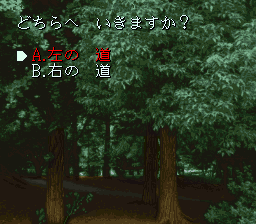
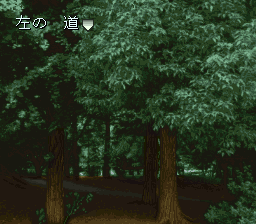
The player lays the choice text out itself: the question wraps at 14 characters, and each choice at 12 after its letter, and the whole must fit in 12 lines. A longer one stops the novel when the reader reaches it, with 分岐テキスト ノ モジスウ ガ オオスギマス, "the choice text has too many characters". The editor doesn't warn: test every choice once. A two-way choice with a short question has room for two choices of 60 characters each; most choices are a few words.
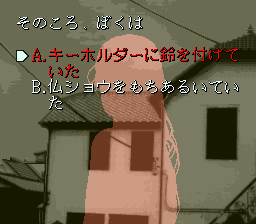
The sample's choices are short and come at the turning points. Part one has nine, of two and three ways, and almost every side is a card or two of its own that jumps back to the main line: the story is one road with views to either side. Only its first choice has a side that ends the reading early, and one side of a three-way choice jumps back to ask again. Its question is often half a sentence (そのころ、ぼくは, "at that time, I…") that the choices complete. The sample novel has its shape.
Items#
Items are what a novel remembers. Each has a name of up to 8 characters, a type and an initial value, and a novel has at most 30. They are made in the Item tab アイテム: R opens its menu, and Make サクセイ asks for the name (from the name grid), then the type, then the initial value. The menu's other entries delete, copy, move and rename items as the card list's do.
| Type | Holds | Initial value | Changed by | Tested by | Shown as |
|---|---|---|---|---|---|
| Yes/No アリ/ナシ, a flag | Yes アリ or No ナシ | Yes or No | Set Item; a choice to item | Item Branch: is it Yes, is it No | アリ / ナシ, or オン / オフ (on / off), as the Show Item step chooses |
| Number スウチ | a whole number from −32767 to 32767 | typed on a five-digit pad | Set Item; a choice to item (both only set it: the bug) | Item Branch: less than, equal to or more than a number | the number |
| Name ネーム | up to 8 characters | the editor asks Yes or No here too, not a name | Set Item, which has the reader type it | nothing: no branch reads a Name item | the name |
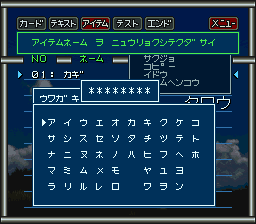
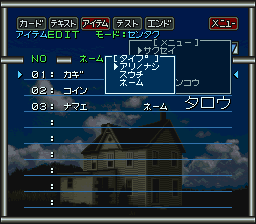
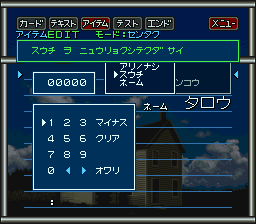
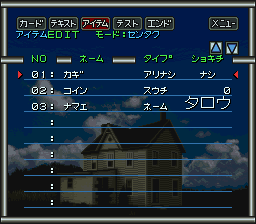
Each reading starts with every item at its initial value. A save point keeps the items as they stand, and continuing a reading brings them back (Playing and testing). A jump never touches them: a story that sends the reader back to an earlier card keeps every item as it was.
A Name item's initial value is offered as Yes / No, like a flag's: the editor has no way to type a name into it. Its name comes from the reader, with Set Item, below.
The item steps#
Set Item#
Set Item アイテム ナイヨウ セッテイ asks for an item, and then a value to suit its type:
- a Yes/No item: Yes アリ or No ナシ;
- a Number item: one of −, = and +, and a number on the pad. Whatever you choose, the item is set to the number: see the operator bug;
- a Name item: nothing. The step asks OK? at once. In play it opens the name entry, and what the reader types becomes the item's value.
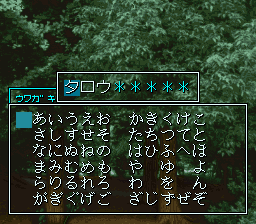
Show Item#
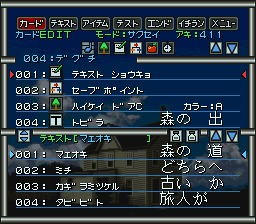
Show Item アイテム ナイヨウ ヒョウジ writes an item's value into the text window: a number, a name, or for a Yes/No item either アリ / ナシ or オン / オフ (on / off), as you choose on the step's page. It writes on from where the text left off, so a text, an item and another text can make one line: sample part two puts its own title on screen this way, from two Name items whose values join into 寺田憲史サウンドノベル劇場.
Item branches#
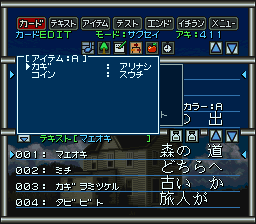
Item Branch アイテム分岐 tests one item. It asks for:
- Item:A アイテム:A, from the Yes/No and Number items;
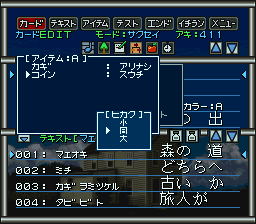
- what to test: for a Yes/No item Yes or No; for a Number item the comparison ヒカク, 小 (the item is less than the number), 同 (equal to it) or 大 (more than it), and the number on the pad;
- Card:A, the card to go to when the test holds.
If the test holds, the reading goes to Card:A. If it doesn't, the card goes on to its next step. So an item branch is a door that opens only when its test holds; the steps under it are what happens otherwise.
Item Branch 2 アイテム分岐2 asks the same again for a second test and Card:B. In play test A is tried first: if it holds, the reading goes to Card:A, whatever B says. If not, test B is tried, and if it holds the reading goes to Card:B. If neither holds, the card goes on to its next step, and a one-test Item Branch does the same when its test fails (all three tried in an emulator: both tests true went to Card:A, only B true to Card:B, neither to the next step).
A Name item can't be tested: the item list of a branch offers only Yes/No and Number items. With none of them in the novel, the branch says アリ/ナシ・スウチ アイテム ガ アリマセン, "there are no Yes/No or Number items".
Choices that set items#
Two-way Choice to Item テキスト2タク アイテムナイヨウセッテイ and Three-way Choice to Item テキスト3タク アイテムナイヨウセッテイ put a choice to the reader as the text choices do, with a choice text and its two colours, but they lead to no card. Instead, each choice names an item (Yes/No or Number) and the value it gets: Yes or No, or −, = or + and a number. Once the reader has picked, the chosen line's item takes its value and the card goes on with its next step.
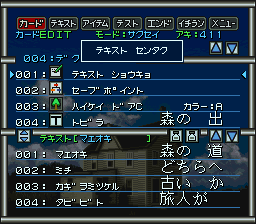
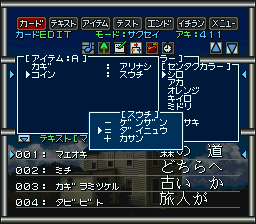
Use them for choices that colour the story without splitting it there and then: the reader's answer is kept, and an item branch further on reads it. Different choices can set different items, or one item to different values.
The operator bug#
Limits and bugs lists this with the cartridge's other traps.
Patterns#
How to build the usual things from these steps. The first two are how sample part two is built.
Somewhere visited once#
Part two lets the reader open three doors from one choice, in any order. Each door is a Yes/No item, ドア1, ドア2, ドア3, starting at No. Each door's card begins with an Item Branch, "is this door Yes? → a card that says the room has been seen", which jumps back to the choice. Below the branch come the room's scene and, at its end, a Set Item that makes the door Yes.
The same build serves anything that should happen once: a first meeting, a clue, a gift.
Several things, in any order#
To go on only once every room has been seen, test each with its own branch, one under another, each sending the reader back while something is left undone: "is door 2 No? → back to the choice", "is door 3 No? → back to the choice", then a Jump to the next scene. A test that fails falls through to the next, so the jump is reached only when all of them pass. Part two's last two rooms put it the other way round: each ends with "is the other door Yes? → on to the next scene", then a Jump back to the choice.
To go on when any one of two things holds, use Item Branch 2 with the same card for A and B.
A name the reader types#
Make a Name item. Where the reader should name someone, put a text that asks for it, then a Set Item on the Name item: the name entry opens. From then on, a Show Item of that item writes the name wherever the story needs it, between two Show Text steps. The name can't be tested, so it can't steer the story.
A counter by cases#
Numbers can be set and compared, but not added to. Where a number should go up by one, branch on what it is now and set the next value by hand. For a number TRUST that runs from 0 to 3, a card that raises it ends:
- Item Branch 2:
TRUST同 0 → cardUP1;TRUST同 1 → cardUP2. - Item Branch:
TRUST同 2 → cardUP3. - Jump to the card where the story goes on (
TRUSTis already 3).
and UP1, UP2 and UP3 each hold one Set Item (TRUST = 1, 2 or 3) and the same Jump. Later, an Item Branch with 大 or 小 turns the total into a choice of scenes. Each place that raises the number needs its own little cards, so keep such counters small. Built from the steps as they work; the study didn't run this one.
Often a flag for each thing that can happen is simpler: "did the reader keep the promise?", "did the reader find the letter?", tested one after another where the story turns.
Several endings#
Give each ending its own card, and end each with a Jump to END, or simply let its steps run out. A number set by choices (Choice to Item with = 1, = 2, = 3) and an Item Branch 2 and Item Branch on 同 at the end pick among three endings from one item.
Part one's early ending asks もう一度遊びますか?, "play again?": a Two-way Choice whose Card:B is END and whose Card:A clears the screen and jumps back to the novel's second card, so the first isn't shown again. If you do this in a novel with items, set them back to their initial values on the way: a jump keeps them as they are.
Fan-made reference material, one of the Eschaton Games Tsukuru guides. Not affiliated with the publishers of the titles it covers. Corrections and questions: contact@eschaton.games.