Playing and testing#
This page is the reader's side of a novel, and the author's way of trying one out. A reading of your own novel, of the samples and a test from the editor all use the same player: what the reader sees here is what a test shows you, but for the few differences under Test mode.
Starting a novel#
From the main menu, Game ゲーム offers User Game ユーザーゲーム, the novel on the cartridge, and Sample Game サンプルゲーム, which lists the sample's part one ゼンペン and part two コウヘン. The cartridge holds one novel of your own: the one in the editor, as it was last saved.
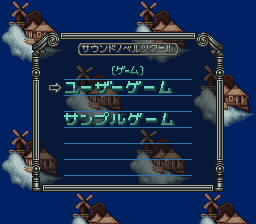
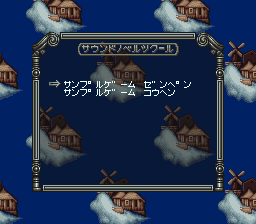
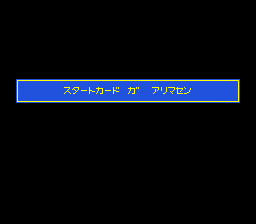
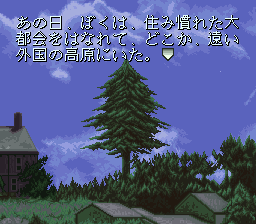
A novel begins at its start card (Branches and items). If it has none, User Game stops before anything plays with スタートカード ガ アリマセン, "there is no start card". A cartridge with an empty save shows this.
If the cartridge holds a saved reading of the novel, a question comes first: Continuing a reading.
The reader's controls#
The reader has one button. A goes on where the text waits with ♡, and at a choice ↑ ↓ and A pick a line. Nothing else is read while a novel plays.
| When | Press | What happens |
|---|---|---|
| A text stops on ♡ (a wait for a key) | A | the text goes on: the next line, or a new page |
| A choice is on screen | ↑ ↓, then A | the cursor moves; A picks the line under it, which is shown again alone with ♡ |
| The chosen line waits with ♡ | A | the novel goes on, to the choice's card |
| The continue question | ↑ ↓, then A | Start from the Beginning or Continue (B does nothing) |
| Text typing out, a Wait step, a fade, an effect | nothing | the novel can't be hurried |
| To stop reading | Reset | the only way out before an ending |
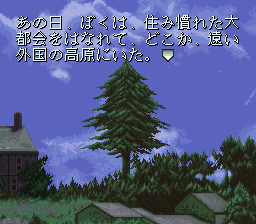
So there is no skipping, no faster text, no going back over what was read, no menu and no way to quit but reaching an ending or pressing Reset (all read from the player's code: it looks at the pad only at a wait for a key and at a choice). The speed the text types at is the author's, set by the Text Speed step テキスト ヒョウジソクド, not the reader's. The game keeps no record of the endings reached, of the text already read or of the routes taken: only the one saved reading, below.
A novel ends when the reading reaches the END card, or a card whose steps run out (Branches and items): the main menu comes back.
The save point#
Save Point セーブポイント, a step of the Branch group, asks nothing (OK?). In play it keeps the reading, silently: nothing shows on screen, and the novel goes straight on.
| Kept by a save point | On continuing |
|---|---|
| the card the reading is in, and the place just after the save point | the card is loaded and the reading goes on from the next step |
| every item's value | restored |
| the background, with its colour variant | drawn again |
| the window frame or silhouette | drawn again |
| the background effect and the staging effect | restored |
| the song playing (and its tempo) | started again |
an endless effect (one marked * in the SE list) | started again |
| the start card's name and the novel's stamp | compared with the novel, to know it again |
| what is in the text window | not kept: the window starts empty |
There is one saved reading for the whole cartridge. A save point overwrites whatever reading was kept before, of this novel or another. It is kept with the cartridge's settings, outside the novel (How it works).
Continuing a reading#
When a novel starts, the game looks at the saved reading. If it is a reading of this novel, it asks Start from the Beginning 最初から始める or Continue 続きから始める, on black, the cursor on the first. ↑ and ↓ move it and A takes it.
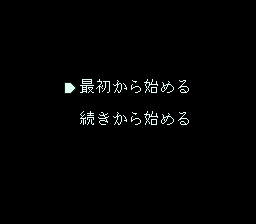
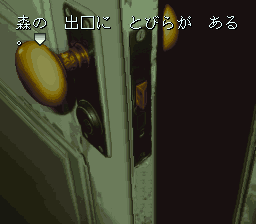
Continue loads the card the reading was in, restores the items, the picture, the frame or silhouette, the effects, the music and an endless sound effect, and goes on from the step after the save point, with the text window empty. Start from the Beginning starts at the start card with the items at their initial values.
The novel is known again by its start card's name and a stamp, a number the editor renews each time the start card is set. So:
- Editing the other cards keeps the reading, as long as the start card isn't set again (read from the editor's code).
- Setting the start card, even to the same card, loses it: the stamp changes, and the next start is from the beginning (Branches and items). The reading stays in the cartridge but no longer matches (checked in an emulator with two novels alike but for the stamp).
- Reaching an ending leaves the reading as it was (read from the code): the next time, the reader is offered Continue from the last save point.
- A reading doesn't travel. Saving the novel to a memory pack and loading it back, or through a Turbo File, carries the novel but not the reading (Saving and sharing).
Test mode#
The editor tests the novel as it stands in the editor, unsaved changes included: there is no need to leave the editor and save before trying a change. Choose the Test tab テスト, from the card list or from a card's page, and then where to start.
| Choice | Where it is offered | The test starts at |
|---|---|---|
| From the start card スタートカード カラ | the Test tab, from the card list or a card's page | the start card, as a reader would |
| From the chosen card シテイカード カラ | the Test tab, from the card list | the card under the card list's cursor |
| From this card コノ カード カラ | the Test tab, from a card's page | the card whose steps are on screen |
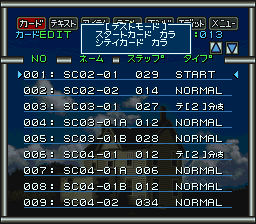
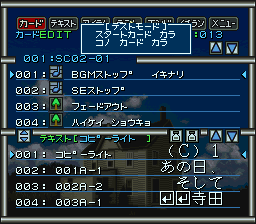
The cursor starts on the second line, so A at once tests from the chosen card or from this card. Move it to the first line to test from the start card.
A test plays as a reading does, with two differences:
- A save point does nothing in a test. The saved reading on the cartridge is never touched by testing.
- X opens the test menu, and the stopper can halt the test at a chosen card (both below).
End Test in the test menu, or an error, brings the editor back, and so does reaching an ending: after the last key wait the test returns to the card list.
The test menu#
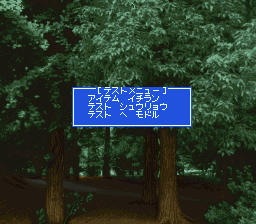
X during a test opens the test menu テストメニュー, except while a background effect or a staging effect is running.
| Entry | What it does |
|---|---|
| Item List アイテム イチラン | lists the items with their types. A on one shows its value, and A again changes it: a Yes/No item from a small list (アリ, ナシ), a Number item on the pad |
| End Test テスト シュウリョウ | ends the test, back to the editor |
| Back to Test テスト ヘ モドル | closes the menu and goes on with the test |
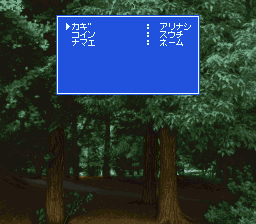
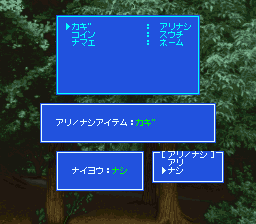
Item List lets a branch be tried both ways without reading the story again: stop before the branch, set the item to what you want to try, and choose Back to Test. Changing a Name item here was not tried in the study.
The stopper#
Set Stopper ストッパー セット in the card list's menu marks the card under the cursor; the list draws it in red. During a test, a jump or a branch into that card stops the test with テスト ストップ チュウ, "test stopped", and the test menu. Back to Test goes on into the card; End Test returns to the editor.
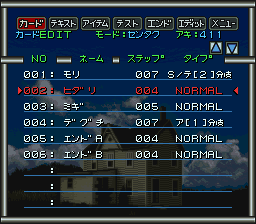
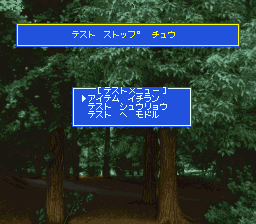
One card has the stopper at a time. Clear Stopper ストッパー クリア takes it off, and it is also cleared each time the editor is opened.
Testing from a card#
Testing from this card or from the chosen card plays from the top of that card, so a scene deep in the novel can be tried without reading up to it. Nothing the reader would have passed on the way there has run, so if the card's branches test items, set them from the test menu to what a reader would have by then.
When a novel stops#
A novel that meets something it can't do shows a message and ends the reading there: the main menu comes back, or the editor in a test. There are seven:
| No. | On screen | In English | What causes it | What to do |
|---|---|---|---|---|
| 0 | ヒョウジ エラー | Display error | a Show Item on an item whose type the player doesn't know | nothing the editor makes: a sign of damaged data |
| 1 | ステップ シンタックス エラー | Step syntax error | a step the player doesn't know | the same: damaged data |
| 2 | アイテム ガ アリマセン | There is no such item | an item step naming an item that isn't in the item list (deleted or renamed) | make the item again, or change the step |
| 3 | アイテムタイプ ガ チガイマス | The item's type is wrong | an item step meeting an item of another type than the step was made for, such as an item deleted and made again under the same name as another type | make the step again on the item as it is now |
| 4 | 分岐テキスト ノ モジスウ ガ オオスギマス | The choice text has too many characters | a choice text that doesn't fit in 12 lines | shorten the question or the choices (Text choices) |
| 5 | テキスト ガ アリマセン | There is no such text | a step naming a text (or a choice text) that is no longer there | make the text again, or change the step |
| 6 | カード ガ アリマセン | There is no such card | a jump or branch to a card that is no longer there | make the card again, or change the step |
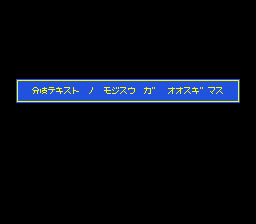
Errors 2, 3, 5 and 6 come from a step that names something by a name it no longer has, and the player finds out only when a reader reaches the step. After deleting or renaming a card, a text or an item, test every route through the steps that named it. Error 4 is found only by playing the choice. Errors 0 and 1 can't come from what the editor makes.
Limits and messages has the editor's own messages, which it shows while you work, in English.
Fan-made reference material, one of the Eschaton Games Tsukuru guides. Not affiliated with the publishers of the titles it covers. Corrections and questions: contact@eschaton.games.