The step commands#
A novel is a set of cards カード, and a card is a list of steps ステップ: play this song, show this picture, type out this text, ask this question, go to that card. When the reading reaches a card, the player runs its steps from the top, one after another. Everything a novel does is one of 30 commands, in six groups. This page goes through them group by group: what each command's page asks in the editor, and what it does in play.
| Icon | Group | On screen | Its commands |
|---|---|---|---|
| a note | Sound | サウンド | Start BGM, Stop BGM, Start SE, Stop SE |
| a tree | Graphics | グラフィック | Set Graphic, Clear Graphic, Fade In, Fade Out, Fade Colour, Background Colour, Background Effect, Staging |
| a page and a pen | Text | テキスト | Text Area, Show Text, Clear Text, Text Position, New Line, Text Speed, Wait for Key |
| a chart of boxes | Branch | 分岐 | Two-way Choice, Three-way Choice, Item Branch, Item Branch 2, Jump, Save Point |
| an apple | Item | アイテム | Set Item, Show Item, Two-way Choice to Item, Three-way Choice to Item |
| a clock | Timer | タイマー | Wait |
The icons are the six above a card's steps, in this order, and each step in the list carries its group's icon.
Adding a step#
On a card's page (The editor):
- A on a line of the steps opens the step menu ステップ メニュー. Pick a group, then a command, and the command's page asks what it needs, one thing after another, each from a small list or a number field. A command with nothing to set asks OK? OK? Yes / No. The new step goes in above the line the cursor was on (Adding a step).
- R on a step offers Delete サクジョ, and nothing else: to change a step, delete it and make it again.
- START on a step shows what is in it (Step details).
- A card holds 512 steps; the 513th is refused with 512ステップ マデデス ("up to 512 steps"). The sample's longest card has 90 (Limits).
How a card plays#
The steps run in order, and most take no time: a picture appears, a song starts, a colour is set, and the next step follows at once. What holds the card is what the reader must see or answer: a text while it types out and at each ♡ in it, Wait for Key, Wait, and a choice until the reader picks. A sound effect doesn't hold it: the sample puts a Wait after an effect it wants heard.
Nothing is cleared between cards. The picture, the text on screen, the song and an endless effect go on into the next card until a step changes them. A card that should start clean says so: the sample's first card begins by stopping the music and the effects and clearing the screen.
A card ends with a jump or a choice. Every card of the samples does, but for a few last cards of a story, which stop on a Wait for Key. What the player does when it runs off the end of a card isn't settled by this guide's study: end your last cards with a Jump to END, which returns to the main menu.
Sound#
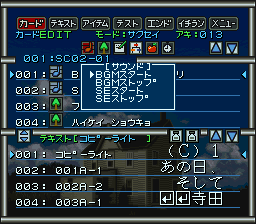
| Command | On screen | The page asks | In play |
|---|---|---|---|
| Start BGM | BGMスタート | A song from the list [BGM], by name: the 60 of the cartridge, and a memory pack's after them. Then its Tempo and whether it fades in フェードイン スタート or starts at once イキナリ | Plays the song, in place of any song playing, at its own speed or faster or slower by the Tempo |
| Stop BGM | BGMストップ | Stop ストップ (the step list shows it as イキナリ, at once) or Fade Out フェードアウト | Stops the music at once, or fades it out |
| Start SE | SEスタート | An effect from the list [SE], by name: 256 of them. A * before the name marks an effect that goes on until stopped | Plays the effect; the card goes on at once. A * effect (rain, wind, cicadas …) plays until a Stop SE, and a save point remembers it |
| Stop SE | SEストップ | Nothing: OK? | Stops the effect |
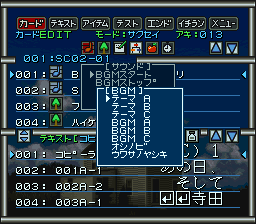
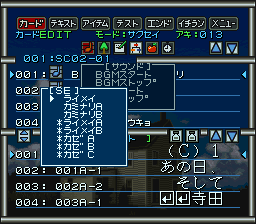
Start BGM asks for three things: the song, its Tempo テンポ, and whether it fades in フェードイン スタート or starts at once イキナリ. The Tempo plays the song faster or slower than it was written:
| Tempo | On screen | The song plays at |
|---|---|---|
| normal | フツウ | its own speed |
| fast | ハヤイ | × 1.5 |
| slow | オソイ | × 0.75 |
| very fast | トテモハヤイ | × 2.5 |
| very slow | トテモオソイ | × 0.625 |
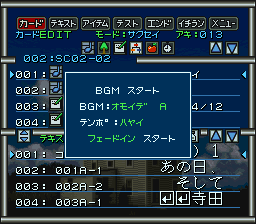
The songs are numbered from 0 in the list's order, 60 of them, and a novel can also play songs 60 and up from a memory pack of Kanadeeru songs, chosen under Data (Music and sound; whether this list offers them was not checked). Music and sound has every song and effect with a player. The sample's title card starts song 13, オモイデ A, fast and faded in: .
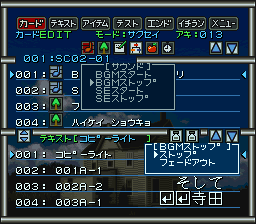
Start SE plays one of 256 effects. 87 of them have a * before the name: thunder, wind, waves, cicadas and the like, which go on until a Stop SE. The other effects play once. The novel goes on while an effect plays; there is one Stop SE for every effect, with nothing to choose. The sample's first card sets its cicadas going, *セミ , and they sing on through the title.
Graphics#
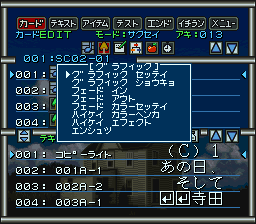
| Command | On screen | The page asks | In play |
|---|---|---|---|
| Set Graphic | グラフィック セッテイ | The kind: background ハイケイ, window frame マドワク or silhouette シルエット. Then the picture, from a list of names or by sight, and its colour variant カラー:A–F | A background fills the screen. A frame or a silhouette goes over it: one of the two at a time |
| Clear Graphic | グラフィック ショウキョ | Background ハイケイ, or frame and silhouette マドワク・シルエット | Takes it off the screen |
| Fade In | フェードイン | Nothing: OK? | Brings the screen in from the fade colour |
| Fade Out | フェードアウト | Nothing: OK? | Takes the screen out to the fade colour |
| Fade Colour | フェード カラーセッテイ | One of eight: black クロ, blue アオ, red アカ, yellow キイロ, green ミドリ, purple ムラサキ, orange オレンジ, white シロ | The colour the fades after it go out to and come in from |
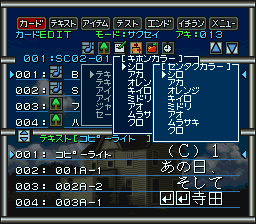
| Background Colour | ハイケイ カラーヘンカ | The same eight, or base colour キホンカラー, the picture's own | Changes the background's colours; base colour puts them back |
| Background Effect | ハイケイ エフェクト | Stop テイシ, Scroll スクロール, Raster Scroll ラスタースクロール, Flash フラッシュ, Shake ユラス | Sets the background scrolling, flashing or shaking; Stop ends it |
| Staging | エンシュツ | Stop テイシ, rain アメ, snow ユキ, lightning カミナリ, spattering liquid トビチル エキタイ, a cut キラレル, will-o'-the-wisps ヒトダマ, running liquid ナガレル エキタイ | Plays the effect over the scene; Stop ends it |
Pictures#
Set Graphic グラフィック セッテイ asks three things:
- The kind: a background ハイケイ, which fills the screen; a window frame マドワク, bars over the background with the picture showing between them; or a silhouette シルエット, a figure or an ornament laid over the background.
- The picture, from the list of its kind by name. With the System menu's Background Select set to by sight ビュー センタク, the page shows the pictures themselves to pick from (The System menu).
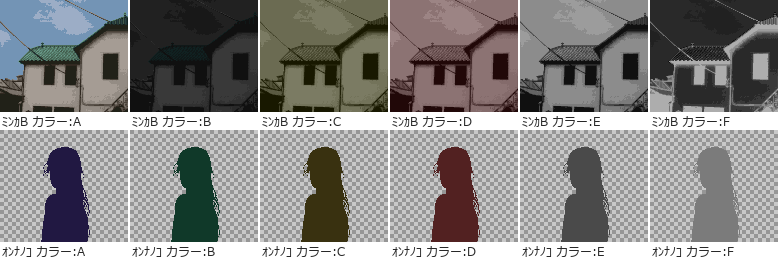
- Its colour variant, カラー:A to F: every picture comes in six colourings, from full colour (A) to night, sepia, red, grey and negative.
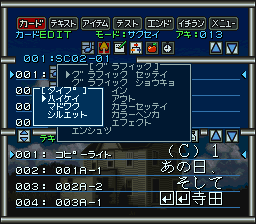
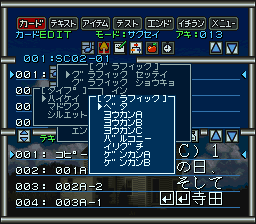
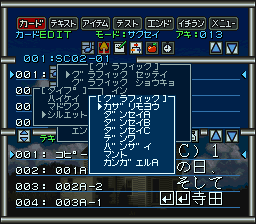
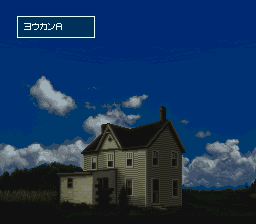
There is one background and one frame or silhouette on screen at a time: a new background replaces the old one, and a new frame or silhouette the one before. A silhouette is not a solid figure: it is drawn as light added to the background, so the background shows through it. Clear Graphic グラフィック ショウキョ takes off either the background or the frame and silhouette. The 91 pictures, their variants and how a silhouette looks over a background are in The pictures.
Fades and colours#
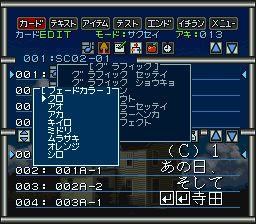
Fade Out フェードアウト takes the screen out to the fade colour, and Fade In フェードイン brings it back. Fade Colour フェード カラーセッテイ sets that colour, one of eight, for the fades after it. The samples fade through black and white most often, through yellow and red now and then: part one's first card fades through yellow into the past, then sets black again.
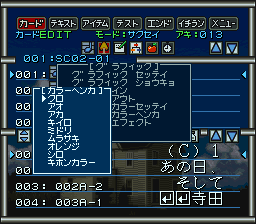
Background Colour ハイケイ カラーヘンカ changes the background's colours to one of the same eight, and base colour キホンカラー puts the picture's own back. The samples use it three times, and base colour three times to undo it.
Effects#
Background Effect ハイケイ エフェクト sets the background moving: Scroll スクロール, Raster Scroll ラスタースクロール, Flash フラッシュ or Shake ユラス. Staging エンシュツ plays an effect over the whole scene: rain アメ, snow ユキ, lightning カミナリ, spattering liquid トビチル エキタイ, a cut キラレル (a slash across the screen), will-o'-the-wisps ヒトダマ and running liquid ナガレル エキタイ. In both lists Stop テイシ ends the effect running.
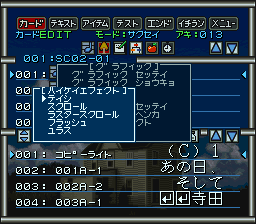
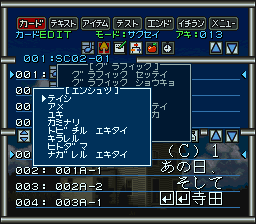
Both keep a setting beside the effect: the program's own lists offer a scroll to the left or the right ヒダリスクロール, ミギスクロール and a flash in each of the eight colours シロ フラッシュ …, and the samples' staging steps carry settings too. How the pages ask for them wasn't recorded. An effect runs on while the steps go on; during a test, the test menu won't open until it has stopped.
Text#
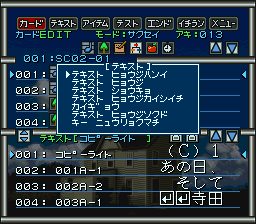
| Command | On screen | The page asks | In play |
|---|---|---|---|
| Text Area | テキスト ヒョウジハンイ | The rectangle texts are written in: where it starts, from its first column カイシ ケタ, and its size | Texts after it are typed into that rectangle and wrap at its right edge |
| Show Text | テキスト ヒョウジ | A text, picked from the texts under the steps テキスト センタク; then its colour ヒョウジカラー, one of eight | Types the text out, a character at a time at the text speed, stopping at each ♡ for A |
| Clear Text | テキスト ショウキョ | Nothing: OK? | Empties the text window |
| Text Position | テキスト ヒョウジカイシイチ | A column カイシ ケタ and a line | The next text starts at that place on the screen |
| New Line | カイギョウ | Nothing: OK? | Moves to the start of the next line, as ↵ in a text does |
| Text Speed | テキスト ヒョウジソクド | A speed from 01, fast ハヤイ, to 16, slow オソイ; the page starts on 08 | Texts after it type out at that speed |
| Wait for Key | キー ニュウリョクマチ | Nothing: OK? | Waits for A, as ♡ in a text does |
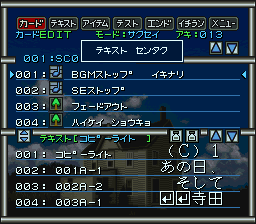
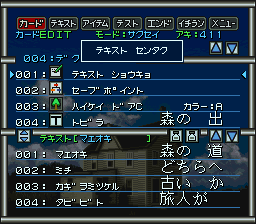
Show Text テキスト ヒョウジ is the command a novel uses most: 215 of part one's 782 steps. It names a text, written in the text editor and kept by name apart from the cards, so one text can be shown from any number of steps. Its page moves the cursor down to the texts under the steps テキスト センタク; pick one with A, then its colour ヒョウジカラー. The whole text is shown in that one colour.
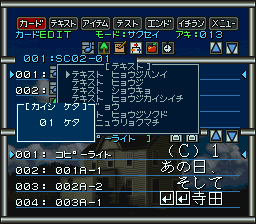
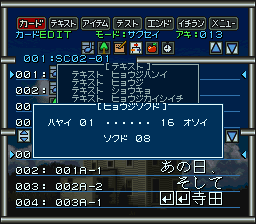
The other six set up the text window: Text Area テキスト ヒョウジハンイ its rectangle (the step list shows it as left/top–right/bottom, 02/05-12/08), Text Position テキスト ヒョウジカイシイチ where the next text starts, Text Speed テキスト ヒョウジソクド how fast it types out, New Line カイギョウ, Clear Text テキスト ショウキョ and Wait for Key キー ニュウリョクマチ, the last three the same as the marks a text can hold. Columns and lines count the screen's character cells from 0 at the top left. All of it, with how the sample builds its title card, is in Texts.
Branch#
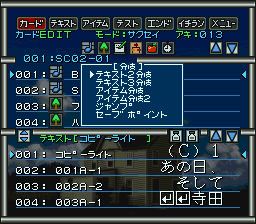
| Command | On screen | The page asks | In play |
|---|---|---|---|
| Two-way Choice | テキスト2分岐 | A choice text; the base colour キホンカラー and the chosen colour センタクカラー; a card for each choice, Card:A and Card:B (END among them) | The reader picks a line with ↑ ↓ and A, sees it again alone, and goes to its card |
| Three-way Choice | テキスト3分岐 | The same, with Card:C | The same, with three choices |
| Item Branch | アイテム分岐 | Item:A, a Yes/No or Number item; for Yes/No, アリ or ナシ; for a Number, a comparison, less 小, equal 同 or more 大, and a number; then Card:A | Goes to the card if the item passes the test; if not, the card goes on |
| Item Branch 2 | アイテム分岐2 | The same twice, A and B, each with its card | Two tests, each with its card |
| Jump | ジャンプ | A card, from the list of the novel's cards | Goes to the top of that card. A jump to END ends the novel |
| Save Point | セーブポイント | Nothing: OK? | Keeps the reading in the cartridge's one slot, without a word; nothing in a test |
Two-way Choice テキスト2分岐 and Three-way Choice テキスト3分岐 show a choice text, a text whose first line is the question and whose other lines are the choices; how it is laid out is in Choice texts. They are the reader's only way to steer the story.
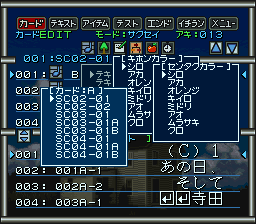
Item Branch アイテム分岐 and Item Branch 2 アイテム分岐2 test the novel's items (its variables, below), one condition or two. A Name item can't be tested: the page offers only Yes/No and Number items, and with none of them says アリ/ナシ・スウチ アイテム ガ アリマセン ("there are no Yes/No or Number items").
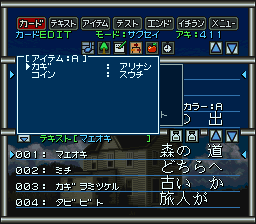
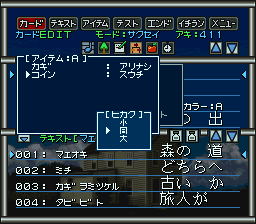
Jump ジャンプ goes to a card by name, from the list of the novel's cards. END is a card too: a jump or a choice to END ends the novel and returns to the main menu. Save Point セーブポイント keeps the reading so far in the cartridge's one saved reading, silently, for the reader to continue later; in a test from the editor it does nothing (Playing and testing).
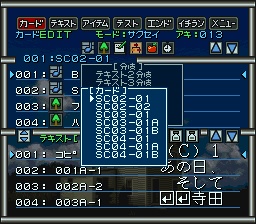
The card list marks a card with a choice as テ[2]分岐 or テ[3]分岐, and one with Item Branch 2 as ア[1]分岐, when the step is added. It is only a label for the list. How the branches make a story, and what an item branch does when its test fails, are in Branches and items.
Item#
| Command | On screen | The page asks | In play |
|---|---|---|---|
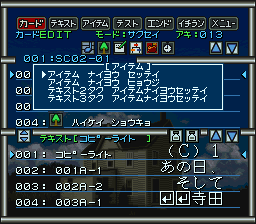
| Set Item | アイテム ナイヨウ セッテイ | An item, then its value: for Yes/No, アリ or ナシ; for a Number, − = + and a number; for a Name, nothing | The item takes the value. On a Name item, the reader types a name |
| Show Item | アイテム ナイヨウ ヒョウジ | An item; for a Yes/No item, whether it reads アリ/ナシ or オン/オフ | Writes the item's value in the text window |
| Two-way Choice to Item | テキスト2タク アイテムナイヨウセッテイ | A choice text and its two colours, then for each choice a Yes/No or Number item and the value it gets | The reader picks; that choice's item takes its value, and the card goes on |
| Three-way Choice to Item | テキスト3タク アイテムナイヨウセッテイ | The same for three choices | The same |
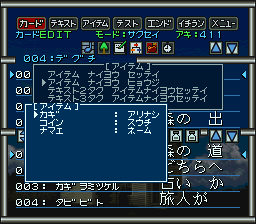
Items アイテム are the novel's variables, up to 30, each Yes/No アリ/ナシ (a flag), Number スウチ or Name ネーム, made on the Item tab. With no items, the item commands say アイテム ガ アリマセン ("there are no items") or, for the choices, that there are no Yes/No or Number items.
- Set Item アイテム ナイヨウ セッテイ on a Name item asks nothing: in play it opens the name entry, and the reader types the name, which the novel can then show (A name the reader types).
- Show Item アイテム ナイヨウ ヒョウジ writes the item's value where the text has got to, so a text after it goes on from there: a name, a number, or for a Yes/No item アリ / ナシ or オン / オフ, as its page chose. Part two shows its credits this way, from Name items.
- Two-way and Three-way Choice to Item テキスト2タク / 3タク アイテムナイヨウセッテイ ask a question as a choice does, but instead of a card each choice sets an item, and the card goes on after it.
Timer#
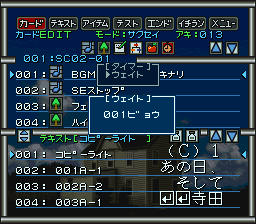
Wait ウェイト holds the card for a number of seconds, three digits 001 ビョウ. The reader can't cut it short. The sample waits a second between two fades, and eight to let the cicadas sing before its title card.
Step details#
START on a step opens a window with all of its settings, by name: for a choice, its text, its two colours and its cards; for Start BGM, the song, the Tempo and whether it fades in. It is the quick way to read a step back.
How the sample opens#
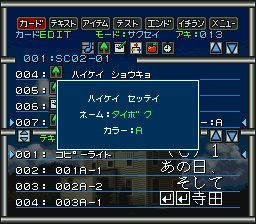
Part one's first card, SC02-01, is 29 steps long, and most commands appear in it. Load the sample into the editor (Data → Sample Load) and open the card to follow it.
| Steps | What they are | What they do |
|---|---|---|
| 1–6 | Stop BGM (at once), Stop SE, Fade Out, Clear Graphic (background), Clear Graphic (frame and silhouette), Clear Text | A clean slate before the story starts, whatever was playing or showing before |
| 7–8 | Set Graphic: background タイボク, variant A; Fade In | The great tree in full colour, faded in from black |
| 9–10 | Text Speed 04; Show Text 001A-1 | The opening narration, typed out over the tree, the reader turning its pages with A |
| 11–16 | Fade Colour yellow; Fade Out; Set Graphic: タイボク, variant C; Wait 1 s; Fade In; Fade Colour black | A flash of yellow into the same tree in sepia, the past; black again for the fades to come |
| 17–19 | Text Area 02/05–12/08; Text Speed 12; Show Text 002A-2 | A narrow window in the middle of the screen, and a slow line into it |
| 20–25 | Text Position 05/06; Text Speed 01; Show Text ETC001; Text Position 07/07; Text Speed 12; Show Text ETC01 | ニンフ written over 妖精, then the end of the sentence after it (ruby by hand) |
| 26–27 | Start SE *セミ ; Wait 8 s | Cicadas, which go on into the next card, and time to hear them |
| 28–29 | Clear Text; Jump SC02-02 | On to the title card |
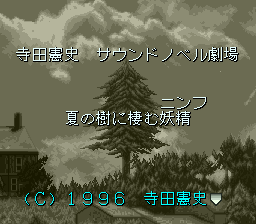
The second card plays the title song (), sets a text area over the whole screen, writes the title, its ruby and the copyright line, waits for A, fades the song out and jumps to the story. The sample novel has its shape card by card.
Fan-made reference material, one of the Eschaton Games Tsukuru guides. Not affiliated with the publishers of the titles it covers. Corrections and questions: contact@eschaton.games.